
You’ve decided it’s time to start hiring employees for your small business. That means also deciding on the best payroll software for paying those employees. The right solution will automate and manage payments, but it can also help your business in many other ways.
Choosing the right solution can be a real challenge for small business owners, as there are multiple features and functions to consider. We’ve compared our QuickBooks Payroll review up against our Gusto review, two of our top payroll service choices, to help you decide which is best for you based on your business needs.
QuickBooks Payroll
QuickBooks offers three payroll plans. We love that you can try the platform for free for 30 days. If you skip the free trial, you can get a discount for three months. There’s also special pricing for a payroll and accounting software bundle.
These are QuickBook Payroll’s three stand-alone plans:
|
Plan |
Price |
Features |
|---|---|---|
|
Core |
$50/month plus $6/employee per month |
Full-service payroll; federal and state tax filing; next-day direct deposit; employee portal and benefits administration |
|
Premium |
$85/month plus $9/employee per month |
Core features plus local tax filing; automatic state new hire reporting; same-day direct deposit; time tracking; premium support; HR support center and expert review |
|
Elite |
$130/month plus $11/employee per month |
Premium plan features plus expert setup; tax penalty protection and a personal HR advisor |
Similar to Gusto, we appreciate that QuickBooks offers unlimited payroll runs with all plans. We especially like that every plan permits multistate payroll. However, we were disappointed that, unlike Gusto, QuickBooks does not file local taxes with the entry-level plan. In general, we found QuickBooks’ higher-tiered plans to be more affordable than Gusto’s, especially for businesses with multiple employees.
Tie
The best-priced solution depends on your business. If you operate in a single state, want the flexibility to pay internationally or need basic HR functions while keeping costs down, go with Gusto. QuickBooks is the right choice if you are a multistate business looking for an affordable plan, you want to bundle payroll with accounting software or if you have multiple employees and need premium features at the best rate.
Payroll Features
Gusto
Gusto offers excellent full-service payroll across all its plans. You can pay employees and contractors by check, direct deposit and prepaid debit cards. The Simple plan provides two- or four-day direct deposit, while higher-tiered plans include next-day deposit. We appreciate that Gusto lets you automate payroll and allows for unlimited runs at no extra charge. The platform also automatically calculates and files all federal, state and local payroll taxes.
Gusto stands out for offering an employer of record service, Gusto Global, which lets you pay employees internationally. You can also pay international contractors, but both of these services cost extra.
QuickBooks Payroll
Similar to Gusto, QuickBooks lets you automate payroll, process unlimited runs and pay employees and contractors in multiple ways. What sets QuickBooks apart is that the Core plan includes next-day direct deposit, while all other plans include same-day direct deposit. This allows you to hold on to cash longer and get employees paid quicker.
QuickBooks will calculate and file your taxes, but local tax filing doesn’t come with the Core plan. We love that businesses subscribed to the Elite plan get assistance and up to $25,000 penalty protection in case of any IRS issue. While the software doesn’t support international payments, it integrates with solutions for international payments.
QuickBooks Payroll
While both solutions offer robust payroll, QuickBooks slightly edges out Gusto because of its quicker direct deposit times and tax penalty protection with advanced plans. However, Gusto is still a great choice, especially for businesses looking for an affordable plan that includes local tax filing.
HR Tools
Gusto
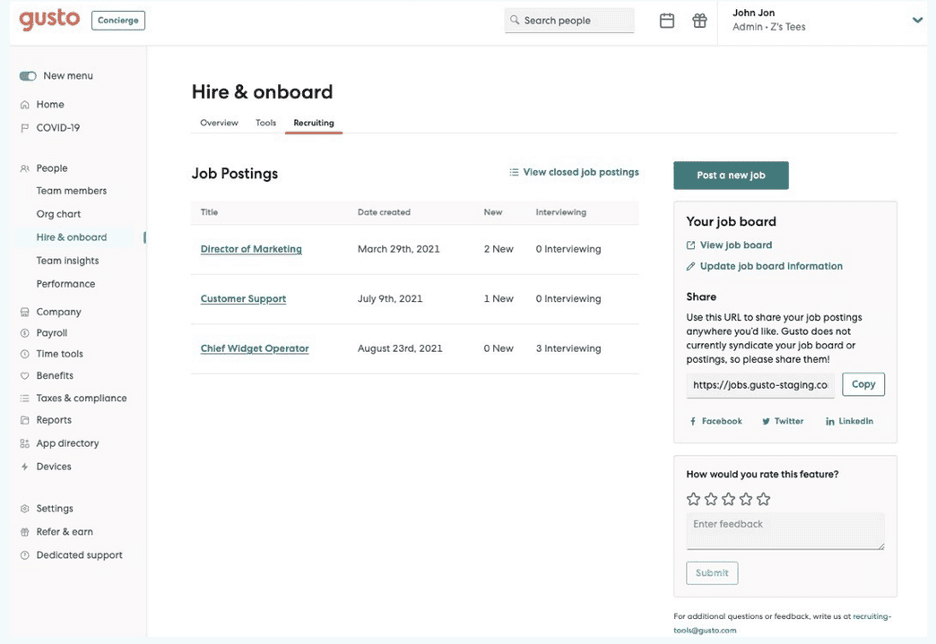
We love that Gusto includes useful HR features, so businesses on a budget can get help hiring and managing employees without having to pay for a dedicated HR person. Gusto’s Simple plan comes with hiring documents, e-signatures, offer letter templates and onboarding checklists, so you can save time when bringing on new people.
We especially like that Gusto’s two high-tier plans include tools for creating job posts and tracking applicants, customized offer letters and onboarding checklists, and a background check add-on. You can also manage performance reviews and conduct employee surveys. The HR Resource Center helps you build an employee handbook and stay compliant with local and state laws. We found direct access to a certified HR expert for Premium plan subscribers to be particularly useful.
QuickBooks Payroll
While QuickBooks offers useful HR tools, we were disappointed that they aren’t included in the Core plan. You’ll have to sign up for the more expensive Premium and Elite plans to get access to the HR support center, which includes employee onboarding checklists, employee handbook tools and features to help manage employee performance.
Similar to Gusto, the highest-tiered plan also includes access to HR advisors who can help you with all aspects of hiring and managing employees, as well as providing guidance on state and federal compliance regulations. Unlike Gusto, QuickBooks doesn’t provide in-house HR experts. Instead, they provide HR support externally through Mineral, Inc.
Gusto
While both payroll service providers offer competent HR support, Gusto’s HR features are more robust and available with every plan. In fact, Gusto is our top choice for a payroll service with added HR services. We especially like that, with job postings and background checks, Gusto even helps you find new employees, something QuickBooks doesn’t do.
Integrations
Gusto
Gusto integrates with around 200 third-party business software products, including popular accounting, POS and expense management solutions. Gusto also boasts a number of in-house integrations for employee training, time tracking, expense management, background checks and managing employee performance. We love that Gusto even integrates with QuickBooks Online accounting software.
QuickBooks Payroll
QuickBooks Payroll seamlessly integrates with other Intuit products, most notably QuickBooks Online or Desktop accounting software. If you plan to use QuickBooks for accounting, you’ll find sharing data between the platforms to be a breeze. However, we were disappointed that you can’t use QuickBooks Payroll with other accounting software. In general, QuickBooks Payroll’s external integrations are quite limited.
Gusto
Gusto is the clear winner when it comes to integrations. If you use QuickBooks Payroll, you’re mostly limited to integrations with other Intuit products. Meanwhile, Gusto connects with hundreds of other software solutions, even QuickBooks accounting software.
Employee Benefits
Gusto
Gusto lets you offer a variety of benefits packages to your team. Dental, vision and medical insurance administration with over 100 carriers comes free of charge with Gusto as your broker, or you can pay an additional $6 per employee per month to keep using your current broker. Employees can sign up right from the platform, and benefits are automatically deducted from payroll. While we love how easy Gusto makes offering health insurance, we were disappointed that coverage is limited to 38 states.
We appreciate that Gusto also offers HSAs and FSAs, disability and life insurance, workers’ compensation, college savings plans, commuter benefits, and 401(k) plans. While some of these benefits come as paid add-ons, they are easy to manage right from Gusto’s platform. We also love the Gusto Wallet app that helps employees request on-demand payments, manage their money and build savings.
QuickBooks Payroll
QuickBooks also makes it easy to offer your employees benefits packages. Health insurance benefits are offered through Allstate Health Solutions with over 200 carriers. You can also get HSA, FSA and COBRA coverage. We especially like that QuickBooks provides health insurance in more states, 48 in total, except for Hawaii, Vermont and Washington, D.C. Workers’ compensation insurance and 401(k) retirement plans are also available through third parties for an additional fee.
Gusto
When it comes to employee benefits, Gusto has the stronger offering. Gusto offers more than QuickBooks, like commuter benefits and college savings plans. Plus, with Gusto, you have the flexibility of using your own insurance broker. The only downside is that you might not be able to use Gusto to offer health insurance in some states.
Ease of Use
Gusto
Running payroll from Gusto is a piece of cake, even for small business owners new to payroll software. It’s simple to manually enter information and automate payroll cycles. We like that employees can painlessly add their own information during self-onboarding. Plus, employees have lifetime access to pay stubs and tax forms in the online portal. The only drawback is that Gusto doesn’t offer a mobile app for processing payroll on the go.
QuickBooks Payroll

QuickBooks Payroll is also easy to navigate, especially for businesses that already use other Intuit products, like QuickBooks accounting software. Similar to Gusto, employees can access the platform to check pay stubs and tax forms. While we think most businesses will have no problem getting things up and running, we appreciate that with higher-tiered plans, someone from QuickBooks will review or assist your setup. We also like that you can do any payroll task from your phone thanks to QuickBooks’ mobile app.
QuickBooks Payroll
While both platforms are easy to use, QuickBooks beats Gusto thanks to its mobile app and setup assistance.
link